Best overall for Saudi marketing teams: Snip. Best for QR codes inside marketing layouts: Canva. Best for a straightforward URL-to-QR workflow: Adobe Express. This 2026 guide compares local hosting, link analytics, design workflows, and the checks you need before putting a code on a flyer, counter, or WhatsApp campaign.
- Snip is the best QR code generator Saudi businesses should shortlist for local hosting, custom domains, and link analytics.
- Choose Canva when your QR code belongs inside a flyer or other marketing layout.
- Choose Adobe Express for a straightforward static QR code pointing to a fixed URL.
- Test the final printed code, destination, and measurement setup before distributing your campaign.
Why this matters
A QR code is an entry point, not the destination. Your customer scans a flyer, opens a menu, visits a campaign page, or starts a WhatsApp conversation. A readable code that opens the wrong page still fails.
For Saudi businesses choosing a generator in 2026, the useful distinction is between creating a QR image and managing the link behind a campaign. Design tools help you place the image. Link-management software adds a different layer: branded links and reporting.
Local hosting also deserves a separate decision. A Saudi-hosted service addresses a hosting requirement; it does not replace your responsibility to review the information your campaign collects or the services your destination page uses.
What makes the best QR code generator for Saudi businesses?
Use these criteria before comparing features. They separate campaign requirements from conveniences that look useful but do not affect the customer journey.
- Destination control: Decide whether the code will open a permanent page or a campaign destination that needs ongoing management. Check how destination changes work before printing.
- Measurement: Distinguish link activity from completed enquiries, purchases, or bookings. Those outcomes require measurement at the destination.
- Hosting and privacy: Review where the service hosts data, what it collects, and how that fits your organisation's obligations.
- Brand control: Custom domains help keep campaign links associated with your business. Check the setup before distributing printed material.
- Design workflow: Choose a tool that fits how you create flyers, packaging, signs, or presentations. Exporting a code and placing it elsewhere is a separate task.
- Print readability: Judge the final printed result, not just the image on your laptop. Contrast, surrounding space, size, and placement all affect scanning.
Best QR code generators at a glance
This 2026 comparison assigns each tool a different job. The ranking favours Saudi campaign requirements first, followed by layout convenience and straightforward code creation.
| Tool | Best for | Standout feature | Key limitation |
|---|---|---|---|
| Snip | Saudi teams managing campaign links | QR codes, custom domains, and link analytics with Saudi hosting | Link reporting alone does not establish sales attribution |
| Canva QR code generator | QR codes within designed marketing materials | QR creation inside the design workflow | Its standard URL QR workflow encodes a fixed destination |
| Adobe Express QR code generator | Creating a straightforward static URL code | Direct URL-to-QR creation | A static code needs replacing when its encoded URL changes |
Choose the workflow before choosing the artwork. A tool that suits a permanent information page is not automatically the right choice for a campaign requiring link reporting and ongoing administration.
1. Snip: best QR code generator for Saudi marketing teams
Snip combines URL shortening, QR codes, custom domains, and link analytics. It is built for marketers and developers in Saudi Arabia, with hosting inside the Kingdom and stated PDPL compliance.
That combination makes it the first shortlist choice when your QR code belongs to a managed marketing campaign rather than a standalone design file. You get link-management features alongside code creation, instead of treating every printed code as an isolated asset.
Snip pros:
- Saudi hosting addresses a specific local infrastructure requirement.
- Custom domains support links associated with your own business identity.
- Link analytics provide reporting beyond simply generating a QR image.
- URL shortening and QR creation sit within the same service.
Snip cons:
- Link analytics do not, by themselves, tell you which visits became sales or qualified enquiries.
- QR generation does not replace checking the final artwork and testing the printed result.
- Local hosting does not settle the privacy position of every external destination or integration in your campaign.
Best for: Saudi marketing teams that want QR codes, branded links, and link reporting within a locally hosted service.
Before printing, confirm how the intended QR workflow handles destination changes and how reports distinguish campaign placements. Those checks matter even when a platform already meets your core feature requirements.
Verdict: Buy for Saudi-focused campaign link management; validate the campaign workflow before print production.
2. Canva: best QR code generator for marketing layouts
Canva's QR code tool lets you create a URL-based code within a design workflow. That suits a flyer, poster, presentation, or other layout where placing the code is part of producing the finished material.
The practical advantage is proximity to the artwork. You can assess the code beside the headline, instructions, and surrounding content rather than generating it separately and deciding on placement later.
Canva pros:
- QR creation fits into the same workflow as the surrounding design.
- You can judge placement in context before exporting the artwork.
- It suits a fixed URL that already has a clear, permanent purpose.
Canva cons:
- The standard URL QR code encodes its destination; changing that encoded address requires a new code.
- A static QR image does not provide scan analytics by itself.
- Editing a design file does not update copies already printed and distributed.
Best for: Teams whose main task is adding a fixed-destination QR code to an existing marketing layout.
For a 2026 campaign with several placements, keep design production separate from the measurement plan. A polished flyer does not tell you whether visitors came from the counter display, event handout, or another channel.
If you need managed redirects or campaign reporting, decide that architecture before inserting the destination into the design. Do not assume that creating a code inside a design tool supplies those functions.
Verdict: Buy for layout convenience; skip the standard static workflow when changing destinations is a core requirement.
3. Adobe Express: best QR code generator for a fixed URL
Adobe Express provides a QR code generator that turns a URL into a scannable code. It suits a straightforward task: create the code, then place the resulting asset in your chosen material.
This is a sensible option when the destination is already settled and you do not need the generator to manage the wider campaign. Keep the scope narrow: the code opens the encoded URL; the landing page handles the visitor's next action.
Adobe Express pros:
- The workflow centres on converting a URL into a QR code.
- It suits a fixed information page with a stable address.
- Code creation can remain separate from your main layout process.
Adobe Express cons:
- Changing the URL encoded in a static code requires generating and distributing a replacement.
- The QR image does not independently record campaign conversions.
- You still need to check placement, contrast, and print quality in the final material.
Best for: Teams that need a standalone static QR code for an established destination.
A permanent address deserves checking as carefully as a campaign link. Open the page on a phone, confirm that the content is current, and make sure the customer can complete the intended task without searching through the site.
If you expect the destination address to change, solve that requirement before generating the code. Reprinting is an operational consequence of static encoding, not a design adjustment.
Verdict: Buy for a fixed URL; skip when you need the generator itself to manage changing campaign destinations.
How the ranking works
The criteria prioritise fit for a Saudi business, not the length of a feature list. Local hosting, branded links, and reporting carry more weight for campaign management; layout integration matters more when the destination is fixed and the artwork is the main deliverable.
This is a feature-and-workflow comparison, not a measured speed or scan-performance benchmark. The recommendations do not assume that a generator controls every factor affecting readability. Your printed material, placement, camera conditions, and destination remain part of the result.
Set up your QR campaign before you print
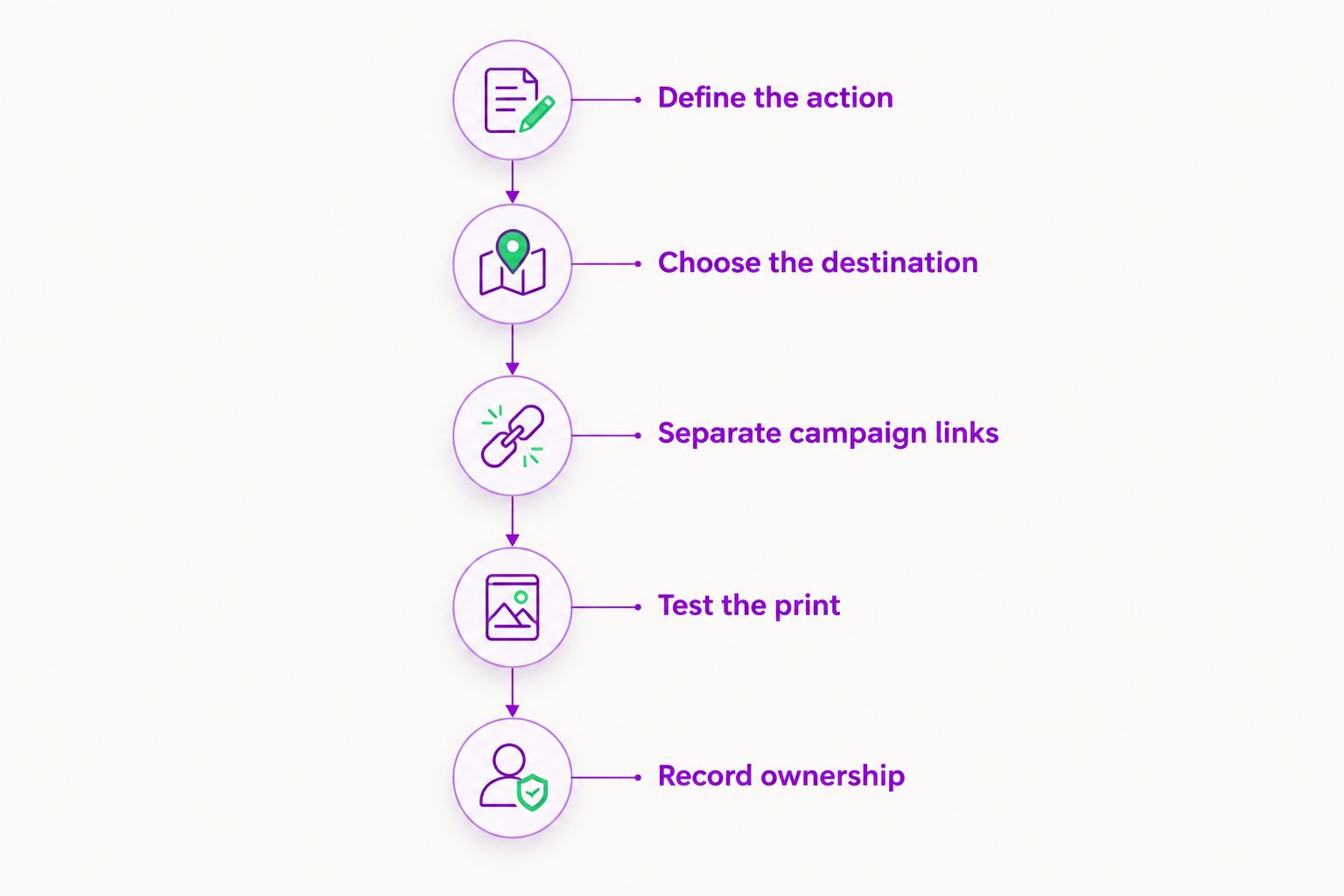
A good 2026 QR campaign starts with the action you want the customer to complete. Work through this sequence before approving artwork or distributing links.
Define the action
Choose 1 destination per code as a practical planning rule. Decide whether the visitor should read information, submit an enquiry, view a menu, or open a WhatsApp conversation.
Write a nearby instruction that matches the destination. If the text promises a menu, the code should open the menu rather than a general homepage. Avoid making the customer repeat the search after scanning.
Choose the destination
Use a destination your business can maintain. Check the page on a phone, including its forms, language choices, and primary action.
For Arabic and English audiences, confirm that the destination offers the intended language experience. A QR code carries data; it does not translate the page or correct an unsuitable mobile layout.
Separate campaign links
If you want to compare a flyer, counter display, and event handout, plan 3 placement-specific links rather than assuming one shared link will identify the source. Confirm that your selected workflow reports the distinction you need.
Name those links consistently in your own records. Keep the placement, destination, artwork file, and campaign owner together so another team member can trace a printed code later.
Test the print
Test on 2 phones, then repeat the check using the actual printed material. This is a practical acceptance check, not a guarantee of universal readability.
Scan at the expected viewing distance and under the lighting where customers will encounter the code. Check the destination as well as the scan: an instant redirect to an incorrect or unusable page is still a failed test.
Record ownership
Assign someone to maintain the destination and retain the final artwork. Record which physical materials use each code before distribution.
After launch, review both link activity and the destination's intended outcome. Do not label every visit as a lead or every repeated opening as a new customer.
Which QR code generator should you choose?
Snip is the best QR code generator for Saudi marketing teams that need local hosting, custom domains, and link analytics. Choose Canva when placing a fixed-destination code inside a design is the main job. Choose Adobe Express when you need a straightforward static code as a separate asset.
For an undecided team in 2026, start with the campaign requirement rather than the generator interface. If you need reporting and branded links, shortlist link-management software first. If you only need a stable page to open from a poster, a static code has a narrower job to do.
You can create an account to assess the local link-management workflow. Complete the destination, reporting, and print checks before committing the code to distributed materials.
FAQ
What's the best QR code generator for a Saudi business?
Choose a generator that matches your hosting, link-management, and design requirements. Saudi campaign teams should prioritise local hosting, custom domains, and link analytics; fixed-destination artwork can use a simpler static QR workflow.
Is Canva better than Adobe Express for QR codes?
Canva is the better fit when the QR code belongs inside a design you are already producing there. Adobe Express suits a straightforward URL-to-QR task when you want to create the code separately from the finished layout.
Can I change a QR code's destination after printing?
You cannot change the data encoded in an already printed static QR code. A code pointing to a managed redirect can use that redirect to reach a different destination, but you must confirm that your chosen service supports the required editing workflow.
Does a QR code generator track sales?
A QR code generator does not establish sales attribution merely by creating a code or reporting link activity. You need measurement at the destination and a defined way to connect campaign visits with completed purchases or enquiries.
Do Saudi businesses need to check QR code data hosting?
Yes, businesses with hosting or privacy requirements should review where campaign data is processed and stored. Check the generator, destination page, and connected services rather than treating the QR image as the entire data flow.
Can a QR code open WhatsApp?
Yes, a QR code can encode a link that opens a WhatsApp destination. Test the exact destination on a phone and confirm that it reaches the intended business conversation before printing.
How should I test a QR code before printing a campaign?
Test the code on the actual printed material using different phones and the expected viewing conditions. Confirm that it opens the correct destination, displays properly on mobile, and lets the customer complete the promised action.
One last thing
Your QR image can remain perfectly readable while the customer journey breaks. A deleted page, changed form, expired campaign, or incorrect destination can make a successful scan useless.
Keep a register connecting each code to its printed placement and responsible owner. For your 2026 campaigns, review the destination whenever the offer or page changes—not only when someone reports a scanning problem. The final quality check is whether the customer completes the intended task, not whether the camera recognises the square.